BBCode in RichTextLabel
Introduction
RichTextLabel allows to display complex text markup in a control. It has a built-in API for generating the markup, but can also parse a BBCode.
Note that the BBCode tags can also be used to some extent in the XML source of the class reference.
Setting up
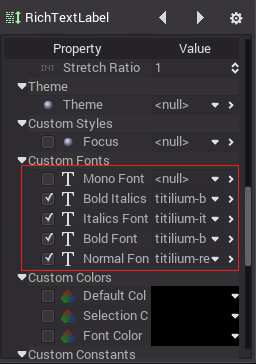
For RichTextLabel to work properly, it must be set up. This means loading the intended fonts in the relevant properties:
Reference
Command |
Tag |
Description |
bold |
|
Makes {text} bold. |
italics |
|
Makes {text} italics. |
underline |
|
Makes {text} underline. |
code |
|
Makes {text} monospace. |
center |
|
Makes {text} centered. |
right |
|
Makes {text} right-aligned. |
fill |
|
Makes {text} fill width. |
indent |
|
Increase indent level of {text}. |
url |
|
Show {url} as such. |
url (ref) |
|
Makes {text} reference <url>. |
image |
|
Insert image at resource <path>. |
font |
|
Use custom font at <path> for {text}. |
color |
|
Change {text} color, use # format such as #ff00ff or name. |
Built-in color names
List of valid color names for the [color=<name>] tag:
aqua
black
blue
fuchsia
gray
green
lime
maroon
navy
purple
red
silver
teal
white
yellow
Hexadecimal color codes
Any valid 6 digit hexadecimal code is supported. e.g: [color=#ffffff]white[/color]